My Ubuntu setup
Table of Contents
I have been using Ubuntu as my primary OS for personal computing since 2015. My notebook at the time was a bit old and I had performance issues with Windows, so I decided to give Ubuntu a try and have stuck with it ever since.
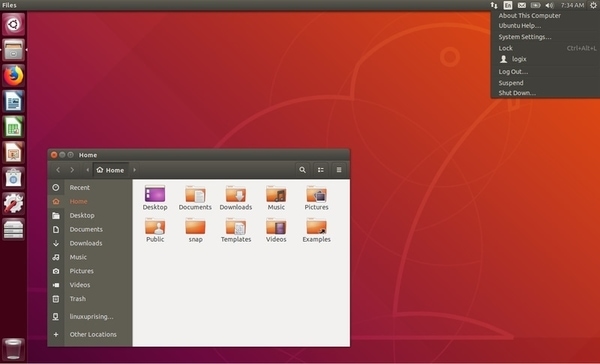
My current notebook is a Dell Inspiron 5570 and I don't remember experiencing any issues that could not be solved with a little bit of Googling.
From time to time, I run Windows in VirtualBox when there is a very specific app I need to use (for example, Photoshop), but otherwise I am more than satisfied with Ubuntu.
Here's a list of the software I use. I believe my set of tools is pretty average, so feel free to recommend your favorite apps!
Essentials
Terminal
I use the built-in one.
Gnome Tweak Tool
A powerful tool to customize the GNOME shell. The only extension I use is called Dash to Panel, which gives me a Windows-style taskbar.

wiki.gnome.org/action/show/Apps/Tweaks
extensions.gnome.org/extension/1160/dash-to-panel
Open Graphics Drivers
I have had zero problems with my displays since I started using the drivers provided by this PPA.
launchpad.net/~oibaf/+archive/ubuntu/graphics-drivers
Office apps
Web browser
Most of the time, I use Google Chrome, and sometimes Mozilla Firefox.
E-mail client, word processing, spreadsheets
I use Gmail, Google Docs, and Google Sheets for these tasks.
Document viewer
Okular is perfect for PDF and EPUB documents. I use its highlighter feature extensively.
Adobe Acrobat for Google Drive is also a decent choice for reading PDF documents. The files are stored on Google Drive and modifications (e.g. highlights) are saved automatically.
Development
Code editor, IDE
VS Code works fine for me. Sometimes I open IntelliJ IDEA for Java development, but often it's just too heavy for my personal projects.
Git client
Although I have tried GitKraken and other Git clients, I mostly use VS Code's built-in Git integration.
Firefox Developer Edition
It has some nice tools but I don't actually use it as part of my development workflow.
www.mozilla.org/en-US/firefox/developer
Multimedia
Media player
VLC plays almost all media formats and is very fast.
VLC for Android is also pretty good.
Audio editor
Audacity is lightweight and easy to use. I don't have any complex audio workflows, so it's perfect for the occasional recording and editing I need to do.
Image processing
ImageMagick is a suite of command-line tools for manipulating images. Although it has many features, I mostly use it for resizing, cropping, and compressing images.
For example, one can easily convert all PNG files in the current directory to JPG files by issuing:
for file in *.png; do convert "$file" "${file/%.png/.jpg}"; done
(The convert command is part of the imagemagick package.)
Screenshot tool
Ubuntu 22.04 comes with a great built-in screenshot tool, but on earlier versions I used Shutter.
YouTube downloader
I frequently download videos from YouTube so I can watch them using VLC (to have better control of playback speed and rewind step size).
My go-to tool was youtube-dl, but nowadays (August 2022) I use yt-dlp which is a more actively maintained fork of youtube-dl.
It can also be used directly to save the audio content of a video as an MP3 file:
$ yt-dlp -x --audio-format mp3 -f 140 <video-id>
The quality of such audio files is far from great but usually it's okay when the goal is to have something to listen to as background music.
HEIF support
HEIF is an image format used by iOS and Android devices for saving photos. These packages enable the standard Image Viewer to open such files and Nautilus to show thumbnails for them.
$ sudo apt update
$ sudo apt install heif-gdk-pixbuf heif-thumbnailer libheif1
Convert all HEIC images in the current directory to a different image format
When it is not possible to upgrade an environment, one can use heif-convert to convert HEIF images to, for example, JPG files:
for file in *.heic; do heif-convert "$file" "${file/%.heic/.jpg}"; done
Manual for heif-convert: manpages.debian.org/testing/libheif-examples/heif-convert.1.en.html
Other tools
dupeGuru
A small utility to find duplicate files.
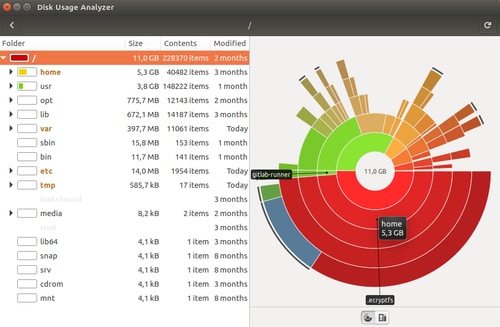
Disk Usage Analyzer
Scans directories and displays a nice visualization of how much disk space is consumed by each subdirectory.
Back to Home